
 Workbook Studio Preview
Build a workbook.
Follow the numbers.
Make a plan, explore an assumption, and see how the answer was calculated. A focused spreadsheet workspace for your browser and your Mac.
Web + Apple silicon Mac 0.2.0-dev.17
See features and compatibility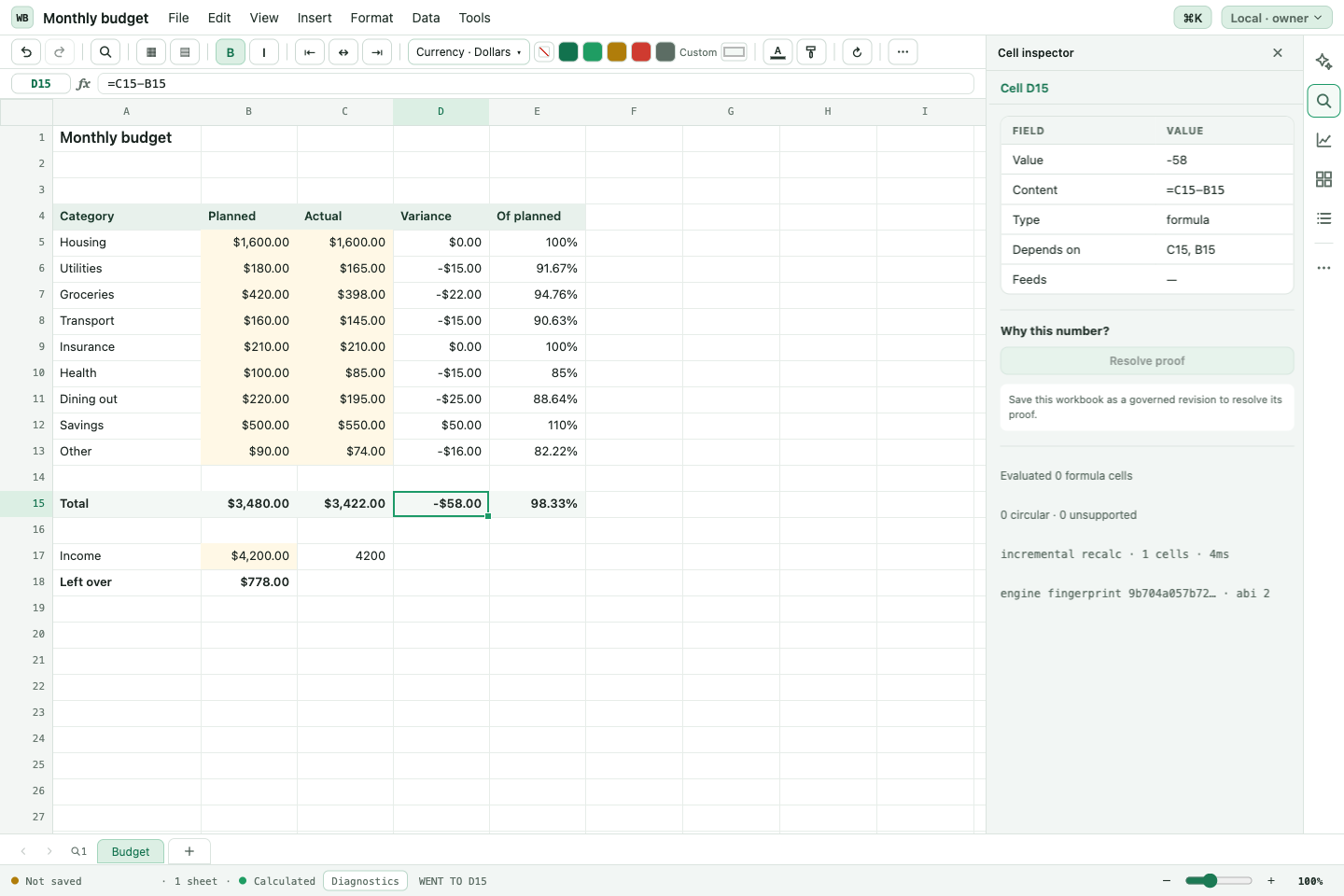
Put your model to work.
Start with an example or a blank sheet. Keep assumptions and calculations together as you explore a budget or business plan.
Explain the result.
Select a cell and see its formula and dependencies beside the grid. Follow the calculation without leaving the sheet you’re working on.
Keep working with your files.
Save an editable workbook copy. Bring supported Excel files in and export your work back to .xlsx.
An input. A formula. A result.
Keep the answer connected to the working.
Change either amount in this small illustration. The result stays beside the formula that produced it. In Workbook Studio, select a cell to inspect its formula and dependencies while you work.
Explore the workbook templates=B2-B3Example figures. This illustration is not the full workbook app.
One workbook. Two ways to work.
Choose the edition that fits.
Edit, calculate and exchange supported Excel files locally in either edition. The Mac app adds native file storage and specialist conversion tools.
| What you can do | In your browser | On your Mac |
|---|---|---|
| Build and edit sheetsKeep your inputs, formulas and results together. | Included | Included |
| Calculate on your deviceChange an input and follow the result without sending each calculation to a server. | Included | Included |
| Inspect formulas and dependenciesSee the selected cell’s formula and the cells it uses, beside your workbook. | Included | Included |
| Templates and example workbooksStart with a working structure, then make it your own. | Included | Included |
| Save and reopen workbook filesKeep an editable copy you can return to and move yourself. | Browser storage and .hwb files | App-data storage, native Save dialog and .hwb files |
| Import and export Excel filesWork with supported .xlsx content and inspect conversion notes. | Included, with compatibility limits | Included, plus specialist conversion tools |
| Installable app and updatesKeep a dedicated workspace on your Mac and update from inside the app. | Open the current web version | Check for Updates → Update & Restart |
| Cloud sync and live co-editingKnow where your work lives before choosing a workflow. | Not in this public edition | Not in this public edition |
Mac: Apple silicon Mac, macOS 13.5 or later. Browser workbooks stay in that browser and on that site. Export a workbook file to keep a separate copy.
Choose for the work you do.
How does it compare?
Workbook Studio is a focused place to build and inspect a workbook. Compare the workflows that matter before moving your files.
| What matters | Workbook Studio Public preview | Microsoft Excel |
|---|---|---|
| Where you workSource | Browser or Apple silicon Mac | Web and desktop editions |
| Excel file exchangeSource | Supported .xlsx import/export on web and Mac; advanced conversion on Mac | Native Excel workbooks; web features differ |
| Work together in one fileSource | No live co-editing in this public edition | Co-authoring with supported versions and cloud storage |
| Storage and device syncSource | Stored locally; move files yourself | Local files or Microsoft cloud storage |
| Existing VBA workflowsSource | Does not run Excel VBA macros | Desktop VBA; Excel for the web does not run VBA |
Features vary by product edition and plan. Formula inspection is also available in Excel; see Microsoft’s formula-tracing guide. Workbook Studio does not claim complete Excel compatibility.
Read the comparison sources
- Microsoft: Excel web and desktop differences
- Microsoft: co-authoring in Excel
- Microsoft: VBA and Excel for the web
- Microsoft: tracing formulas and cells
- Google: access Sheets
- Google: work with Microsoft Office files
- Google: work offline
- Google: automate tasks in Sheets
- Apple: Numbers on your devices
- Apple: convert Numbers and Excel files
- Apple: collaborate in Numbers
Before you open your first workbook.
Can I use it with Excel?
Supported Excel files can be imported and exported locally in both editions. Advanced Excel features and some changes to imported workbook structure require the Mac specialist tools. Full Excel parity is not claimed. Keep the original file and save an .hwb copy to retain your complete Studio workbook.
Where are my browser workbooks saved?
The browser edition stores work in this browser and on this site. It does not automatically sync between devices or between HopperLabs and Simple Jacks. Export a workbook file to keep a separate copy.
Does it replace a shared team spreadsheet?
The current public edition does not include real-time co-editing or automatic cloud sync. Use it for workbooks you work on locally and share by exporting a file.
How do Mac updates work?
Save your work, choose Check for Updates in Workbook Studio, then select Update & Restart when an update is offered.
What does access cost?
Use the current HopperLabs membership and pricing pages for access details. The available plans and their terms are maintained there. See current pricing.
Can I use it for professional tax work?
This is a development preview. Professional tax use is not qualified. It does not file or submit returns.
Your next workbook starts here.
Open a template.
Make it your own.
Explore a real example, change an input, and follow the result.
Preview. Apple silicon Mac, macOS 13.5 or later for the desktop app.